The Sugra API MCP server is now in Anthropic's Connectors Directory
The Sugra API MCP server is now listed in Anthropic's Connectors Directory. It is also listed in OpenAI's Plugins Directory for ChatGPT and Codex. How to add it in Claude, ChatGPT and Codex, and three questions we ran through it today with the answers it returned.
Published
The Sugra API MCP server is now listed in Anthropic’s Connectors Directory. It is also listed in OpenAI’s Plugins Directory for ChatGPT and Codex, since July 21, 2026. Each listing points at the same hosted server, mcp.sugra.ai, so whichever assistant you work in, you add it from a catalog, sign in once, and ask.
This post is the practical part: how to add it in Claude, ChatGPT and Codex, and three questions we ran through the connector today with the answers it actually returned.
What the connector is
The listing reads “1,600+ endpoints across 36 domains, one MCP”. Behind it is Sugra API: one API over 160+ primary sources, from central banks and statistics offices to seismic networks and internet routing.
Rather than hand a model 1,600 endpoint schemas up front, the connector exposes a small, stable tool set. search_endpoints finds the operation for a question, describe_endpoint shows its parameters, call_endpoint runs it, and fetch_data does the find-and-call in one step when the question is simple.
As of today, every tool on the server is annotated read-only and non-destructive: readOnlyHint: true and destructiveHint: false in the server’s own tool list. It is a way to read data with the source attached.
Each answer comes back with where it came from and a clock. In the three examples below that is FRED with the time the series was last updated, USGS with the time its feed was generated, and Sugra NetAtlas with the time its atlas was built.
Add it in Claude
- Open the listing at claude.ai/directory/sugra-api, or in Claude go to Customize > Connectors and search for Sugra API.
- Press Connect to Claude.
- Sign in to your Sugra account when asked. The listing is marked Sign-in Required: the connector signs you in over OAuth, so there is no API key to paste into Claude.
No account yet? Register. The Free plan gives 50 requests a day, and every plan reaches every endpoint.
The directory is one catalog for Claude on the web, desktop and mobile, Claude Code and Cowork. Listed connectors are also eligible for Suggested Connectors, Anthropic’s in-chat recommendations, so Claude may offer the Sugra API MCP server on its own when it looks relevant to your task. On a Team plan, a member without permission to add connectors sees a Request button.
Once you connect it in Claude, Claude Code signed in with the same claude.ai account shows the Sugra API MCP server in /mcp on its own, with nothing to install.
Add it in ChatGPT and Codex
ChatGPT and Codex share one plugin directory, so one listing covers both. In ChatGPT on the web or desktop, open the Plugins tab and find Sugra API, or go straight to the listing. Open its details, select the plus button to install, and sign in to Sugra when prompted. In the Codex app, open Plugins and install it from the same directory.
Add it from the terminal or your editor
This part is for clients without a directory and for anyone who works on an API key: Claude Code on an API key, Bedrock or Vertex, the Codex CLI, Grok, Gemini CLI, Cursor, VS Code, and any other MCP client that supports remote servers. mcp.sugra.ai has an install tab for each of them, with one command or one button, ready to copy.
These clients connect with your Sugra API key, read from the SUGRA_API_KEY environment variable, so you never paste the key itself into a command. No key yet? Get one here.
Claude Code on an API key, in bash or zsh:
claude mcp add --transport http sugra \
  https://mcp.sugra.ai/mcp \
  --header \
  "Authorization: Bearer $SUGRA_API_KEY"
In PowerShell the variable is $env:SUGRA_API_KEY, and the Claude Code tab on mcp.sugra.ai shows both forms.
Codex CLI:
codex mcp add sugra \
  --url https://mcp.sugra.ai/mcp \
  --bearer-token-env-var SUGRA_API_KEY
The Codex CLI reads the variable itself, so the same command works in any shell.
The Grok and Gemini CLI tabs carry their own commands, the Cursor tab has an Add to Cursor button, and the VS Code tab gives you a ready .vscode/mcp.json. All of them are on mcp.sugra.ai.
Three questions, run live today
We asked each of these through the connector on September 24, 2026. The tool path is what the agent called. The numbers are what came back, not a paraphrase.
What is US inflation, year over year?
The agent searched the catalog, found the FRED series operation, read its parameters, and made one call:
call_endpoint
  operation_id: fred_series_series_id
  series_id: CPIAUCSL
  units: pc1
  limit: 6
units: pc1 asks FRED for the percent change from a year ago. The transform is applied at the source and echoed back in the response, so the model does not compute it.
| Month | CPI, % year over year |
|---|---|
| Aug 2026 | 3.35 |
| Jul 2026 | 3.30 |
| Jun 2026 | 3.46 |
| May 2026 | 4.17 |
| Apr 2026 | 3.78 |
| Mar 2026 | 3.29 |
The series is CPI for All Urban Consumers, all items, seasonally adjusted. The response dates it: FRED last updated the series on September 11, 2026, so at the moment of the call the newest number was 12.7 days old.
The same operation with limit: 24 returns the last two years. October 2025 came back as null: the series has no value for that month, and the response carries the gap instead of filling it.
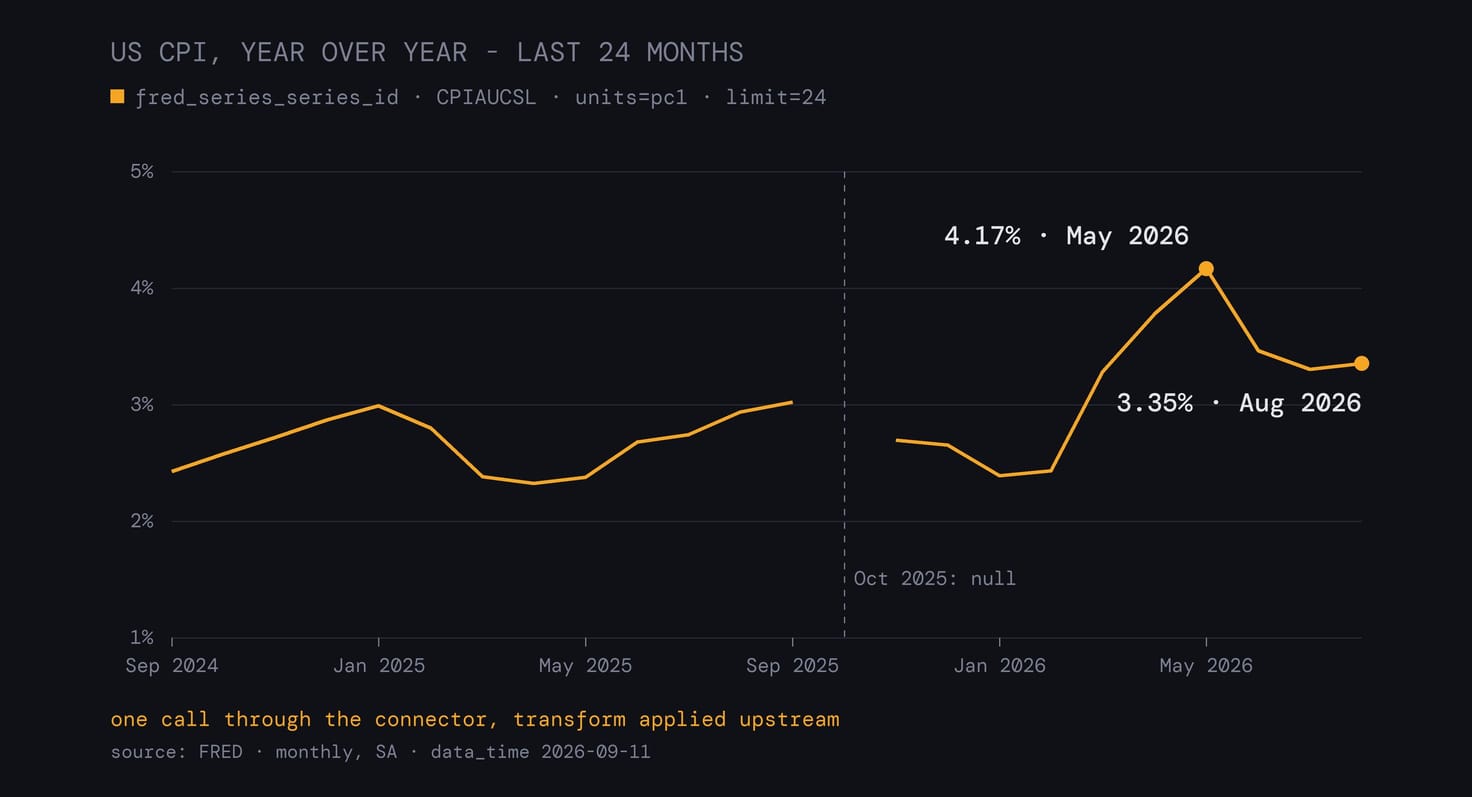
Data: Sugra API - one request, nothing else: GET /api/v1/fred/series/CPIAUCSL?units=pc1&limit=24.
For a question this simple, fetch_data gets there in one step. Asked for “US CPI inflation” with the same parameters and limit: 1, it returned August’s 3.35 directly.
Were there any M6+ earthquakes this week?
The agent searched the hazards toolset and called the earthquake feed:
call_endpoint
  operation_id: hazards_earthquakes
  window: week
min_magnitude: 6| Time (UTC) | Mag | Place | Depth |
|---|---|---|---|
| Sep 17, 14:19 | 6.5 | 169 km W of Nikolski, Alaska | 98 km |
| Sep 20, 09:17 | 6.4 | 49 km NNE of Kainantu, Papua New Guinea | 104 km |
Two events, both with a green PAGER alert. The source is USGS, and the feed was generated on September 23 at 07:19 UTC, just under a day before the call. The response also carries the USGS note that magnitudes are preliminary and subject to revision.
Is this IP address a Tor exit?
call_endpoint
  operation_id: network_ip_ip
ip: 185.220.101.1| Field | Value |
|---|---|
| Country | DE, country-level accuracy |
| ASN | 60729, TORSERVERS-NET Stiftung Erneuerbare Freiheit |
| Prefix | 185.220.101.0/24 |
| Reverse DNS | berlin01.tor-exit.artikel10.org |
| Tor | true |
| VPN network / hosting | false / false |
| Risk score | 50, confidence medium |
Sugra NetAtlas answered, and its clock is different from the other two: not an observation time but the moment the atlas was built, 04:09 UTC that morning. The response also states its own limits. Accuracy is country-only and the city comes back empty, so a login from this address reads as a Tor exit in Germany and nothing more precise. Why the origin of a login matters that much: you don’t get hacked, you get logged into.
Already added Sugra as a custom connector?
If you connected the Sugra API MCP server in Claude earlier by pasting its URL, that connection keeps working and stays under Custom. The directory listing will still show as not installed, and adding it from the directory without removing the old one leaves you with two Sugra connections. Remove the custom one, add the server from the directory, and sign in again.
Skills, on any platform
The connector gives an agent the tools. The Sugra API Skills give it the procedure: how to find an operation, how to read the response, how to cite the source.
In ChatGPT and Codex, install the Sugra API Skills from OpenAI’s Plugins Directory.
In Claude Code, install them with two commands:
claude plugin marketplace add \
  Sugra-Systems/sugra-api-skills
claude plugin install \
  sugra-api@sugra-api-skills
For the other platforms, the post on the pack has the details.
Links
- Install in any client: mcp.sugra.ai
- Add to Claude: url.sugra.ai/claude
- Add to ChatGPT: url.sugra.ai/openai
- Skills in ChatGPT and Codex: OpenAI’s Plugins Directory
- Account: app.sugra.ai/register
- Docs: docs.sugra.ai
Every number in this post came back from that server this morning.